Building an AI Patient Flow Orchestrator
What it is
I wanted to learn how to build a real AI agent — something that watches a changing situation and does useful work over time. So I gave it a genuinely hard problem: keeping a hospital's beds flowing.
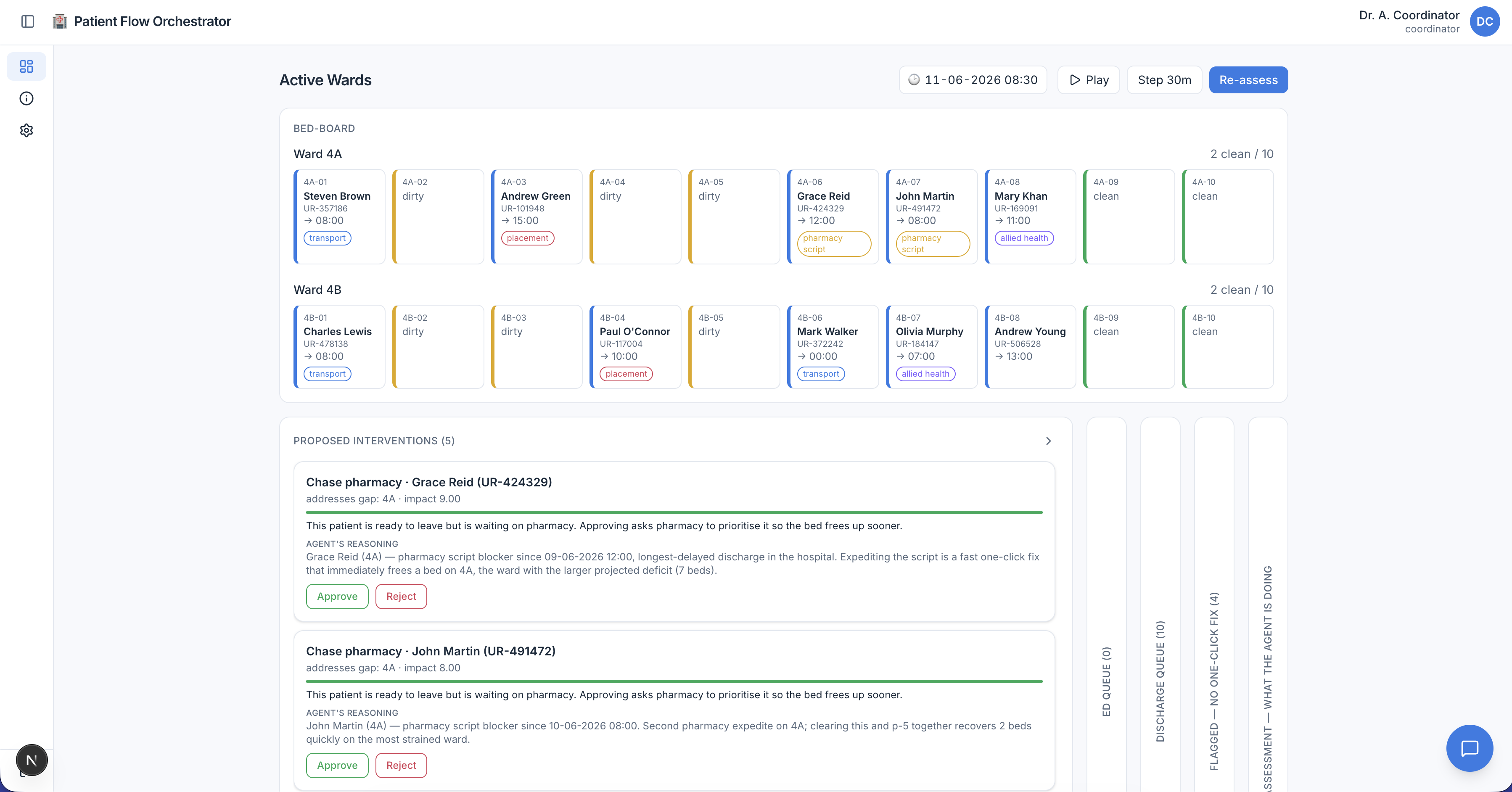
The result — I called it the Patient Flow Orchestrator — watches a simulated ward, predicts where beds will run short over the next few hours, works out what each ready-to-leave patient is stuck on, and proposes a ranked list of fixes for a human to approve.
One caveat up front: the hospital is a vehicle, not the point. I chose patient flow because it exercises every part of an agent while carrying zero clinical risk. Everything runs on a simulated ward with synthetic data: no real patients, and no clinical judgement anywhere in the system.
Code: github.com/devdaviddr/ai-patient-flow-orchestrator
The problem
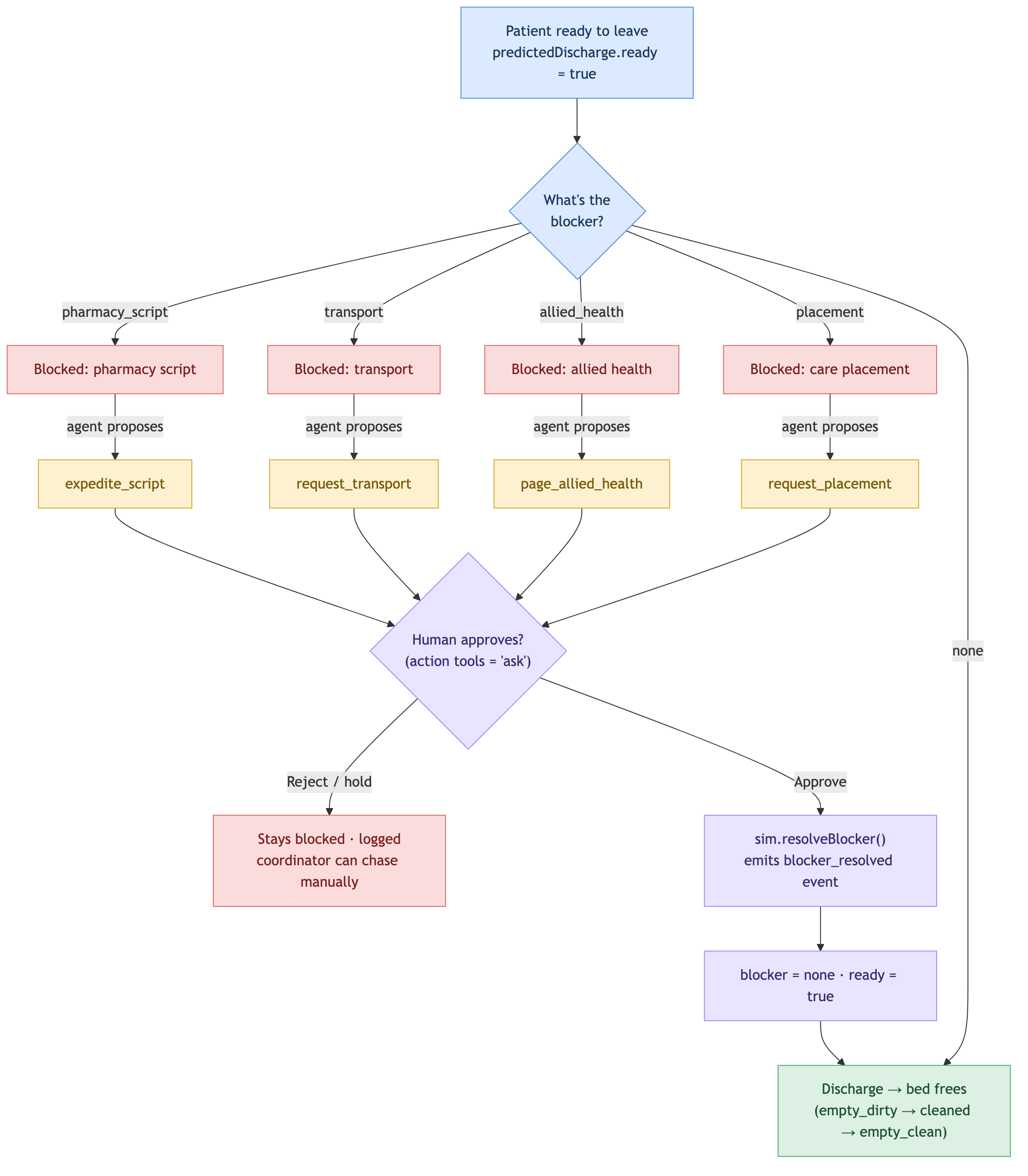
Hospitals run out of beds, and usually not because the building is full of the sickest people. It's because a handful of patients who are ready to go home are stuck. One is waiting on a pharmacy script. One needs hospital transport booked. One needs a care-home placement before they can leave. Every hour they wait, a bed that a new emergency patient could use stays occupied. That waiting time has a name: access block. Clearing it is mostly phone calls and chasing. Logistics, not medicine.
A bed-flow coordinator does that chasing all day, holding the whole moving picture in their head and on the phone. Today's software is a bed-board: it shows the state but it can't think about it. It won't tell you that Ward 4B will be two beds short by 4pm, explain why three discharges are stuck, or line up the actions that close the gap.
That gap, between showing and thinking, is where an agent earns its keep.
I also wanted a problem that was hard in the right ways for learning to build agents. Most agent demos are toys: a single prompt, one tool call, no real consequences. Bed flow gives you changing state, multi-step planning, several tools, a human in the loop, and a result you can actually measure.
The solution
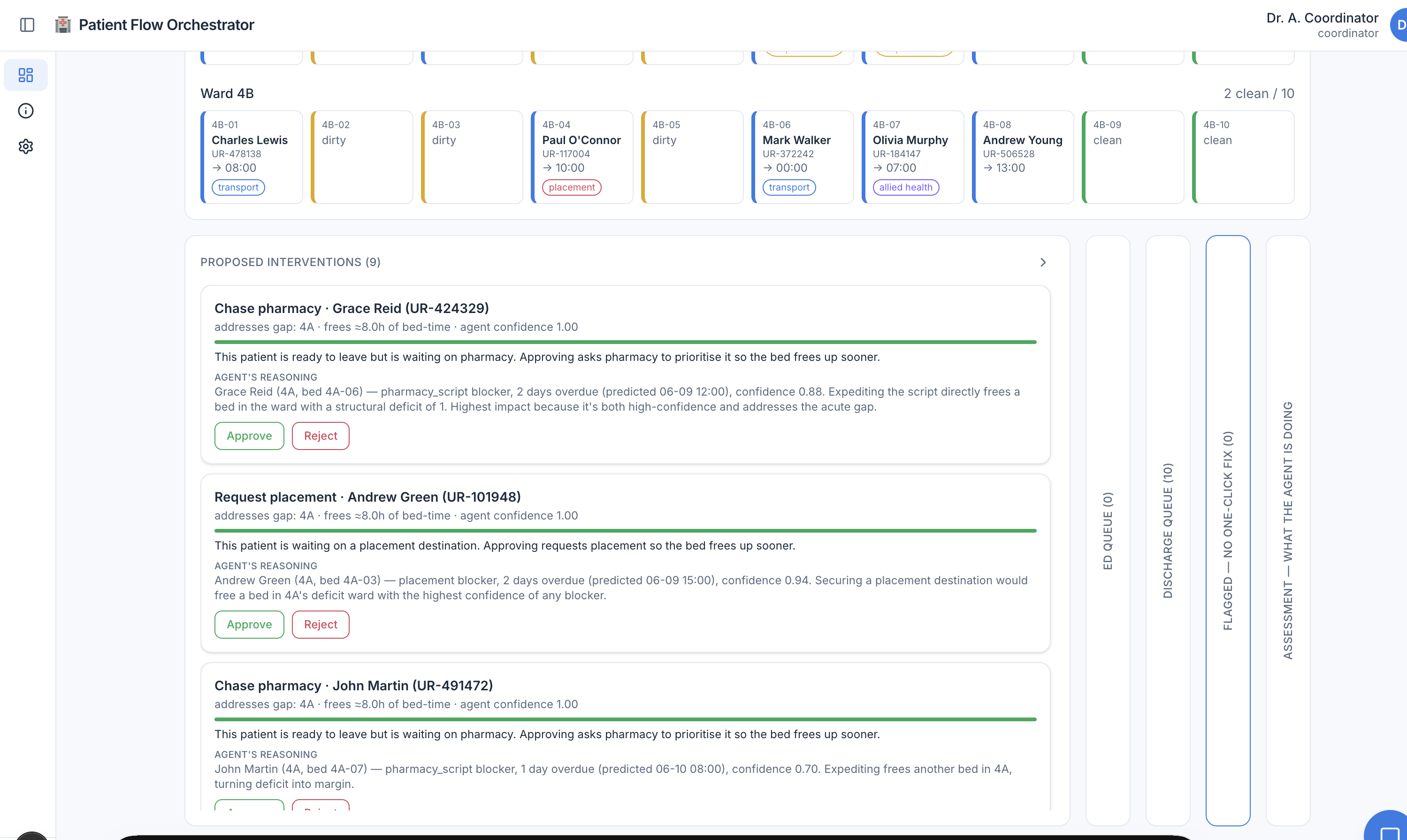
From the coordinator's seat, the agent feels like a sharp colleague who has already read the whole board:
[09:15] Agent: Ward 4B will be 2 beds short by 15:30.
  3 patients are ready to leave but stuck:
    • P-042: waiting on a pharmacy script
    • P-017: waiting on transport
    • P-091: waiting on a care placement
  Suggested fixes, most helpful first:
    1. Expedite the script for P-042   (frees the surest discharge)
    2. Book transport for P-017        (pickup window still open)

[Approval card shown to the coordinator]
Coordinator: ✓ approve fix 1
→ Script expedited. P-042's bed will free up by 15:15.

Agent: Gap is down to 1 bed. Approving transport for P-017 would close it.
Each suggestion arrives as a card ranked by impact and tagged with the agent's confidence, the bed-time it would free, the patient it helps, and the agent's reasoning. Nothing happens until someone clicks Approve.
How it works
The whole thing is a TypeScript and Next.js app. It simulates a hospital (one emergency department plus two ten-bed wards), runs an AI agent over it, shows the suggestions as approval cards, and measures whether the agent actually helped.
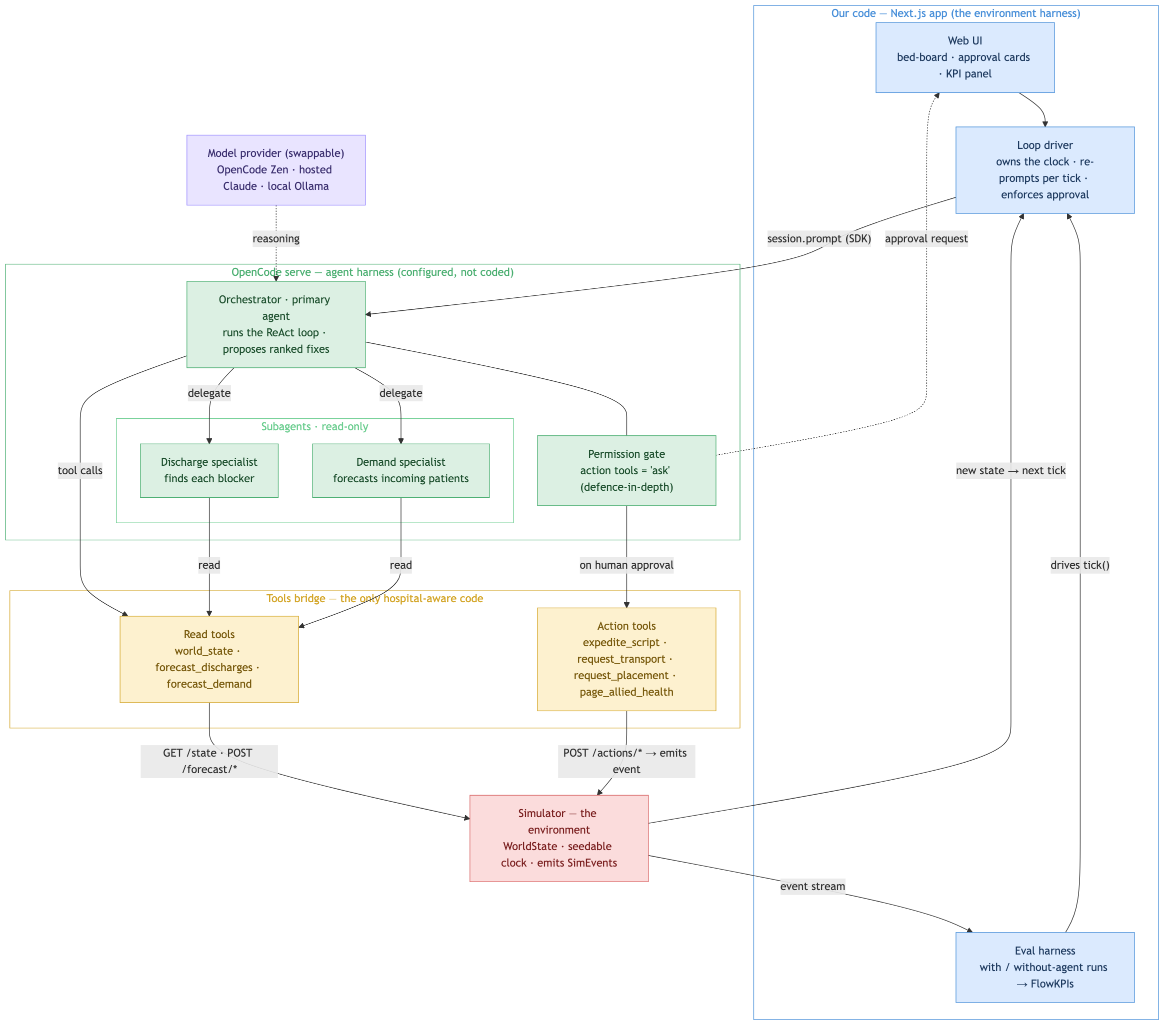
Three colours, three kinds of code, and the boundaries between them are the whole design:
- Blue is my code: the Next.js app, the loop that owns the clock, the simulator, and the screen the coordinator sees.
- Green is configured, not coded: OpenCode runs the agent and its two read-only helpers, all of which are Markdown config files rather than loop code.
- Amber is the tools: the only code that knows it's a hospital at all.
Four decisions did most of the work.
1. Lean on a harness instead of writing the loop
My first instinct was to write the agent loop by hand: call the model, parse what it wants, run a tool, feed the result back, repeat, then bolt on permissions and logging. I quickly realised that the loop — plus tool-calling, delegation, and an audit trail — is most of the work in any agent project. And none of it has anything to do with hospitals.
So I reached for OpenCode, a ready-made harness. A harness is the engine that wraps a language model and turns it into a working agent: it runs the loop, calls the tools, delegates to helpers, enforces permissions, and records the session. OpenCode was built as a coding agent, but its building blocks are general. I configure it and write only the parts that are genuinely mine.
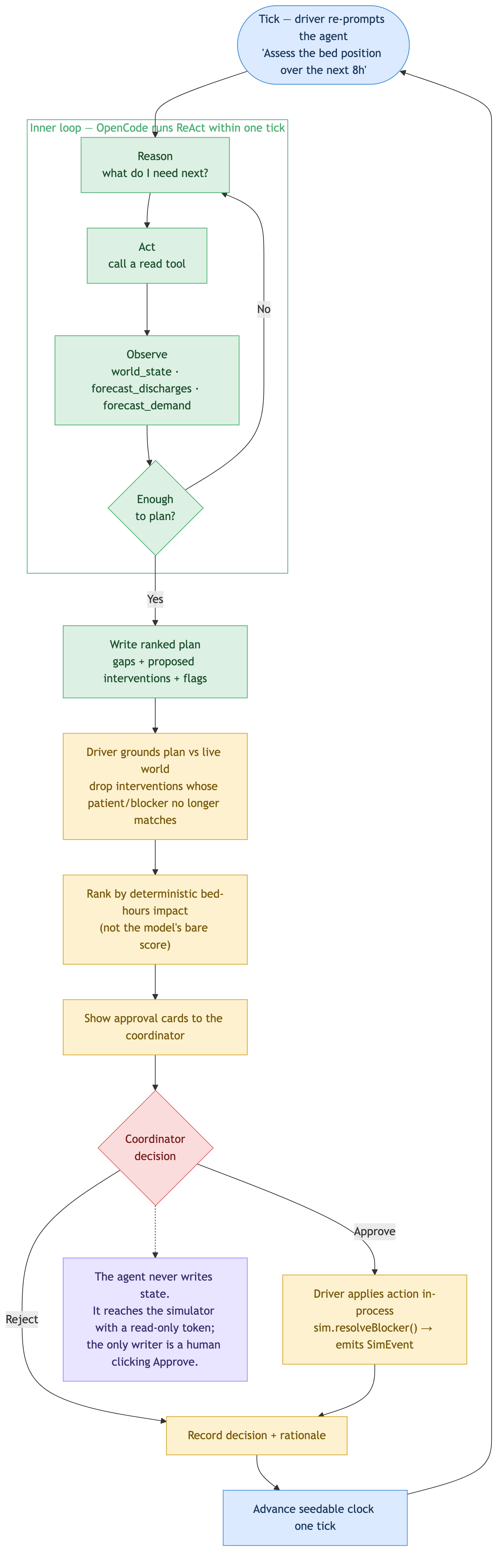
The loop it runs is ReAct, short for Reason plus Act. A chatbot answers in one shot. An agent reasons about what it needs, acts by calling a tool, observes the result, then decides what comes next, and loops until it has enough to write a plan.
There are really two loops here, one inside the other. OpenCode runs the inner ReAct loop within a single tick. My code runs the outer loop that owns the clock and re-prompts the agent each time the ward changes. Keeping the outer loop mine is what makes the system agentic over time, and it keeps the hospital's clock under my control rather than the model's.
2. Put every hospital detail behind tools
The most important decision in the project: only the tools know it's a hospital. An AI tool anywhere near a hospital must never make a clinical call — no acuity, no triage, no diagnosis. The weak way to enforce that is to ask the model nicely in its prompt. The strong way is to make it structurally impossible.
The agent calls plain functions like world_state and expedite_script, and every hospital detail lives behind those tools in the simulator. The read tools hand back beds, blockers, and timings, and nothing clinical. The model can't repeat a triage level it was never handed.
3. Own the approval gate in your own code
The action tools are marked ask, which is meant to pause for a human. But there's a known OpenCode bug where that pause gets skipped when you drive it through the SDK, which is exactly how I drive it. Leaning on the engine would mean the most important safety property in the system depends on a third-party bug staying fixed.
So the gate lives in my own code instead. The agent never changes anything; it writes a plan and stops. When the coordinator approves a fix, my code applies it directly in the simulator. There is no path from the AI to a bed.
There's one more lock: the agent reaches the simulator with its own read-only service token. Even if the model went completely haywire, it simply cannot call an action route. The only way a bed ever changes is a human clicking Approve.
4. Make the safety line a test, not a hope
The gate stops the agent from doing clinical things, but not from saying them; it could still write a triage word into its plan text. A prompt instruction like never make a clinical judgement is a hope; it might hold today and break after a model update.
Because no tool ever feeds the agent a clinical concept, the agent has nothing clinical to repeat, and a test proves it. On every push, CI scans every plan, answer, and saved record for a long list of triage levels, acuity scores, and diagnostic and treatment words. If any of them ever appears, the build goes red. Safety becomes a property of the system's shape.
Does it actually help?
A demo proves the agent works once. It doesn't prove it helps in general, or that it isn't quietly making things worse. The only honest test is to run the same day twice, once with the agent's approved fixes and once with no agent at all, then compare.
The key move: seed the world, not the model. The simulator is seedable, so the same scenario replays identically. That makes the agent the only difference between the two runs, so any change in the numbers is down to it. (Seeding the model would fake determinism in the wrong place, so I never do it.)
Each run is scored on two numbers:
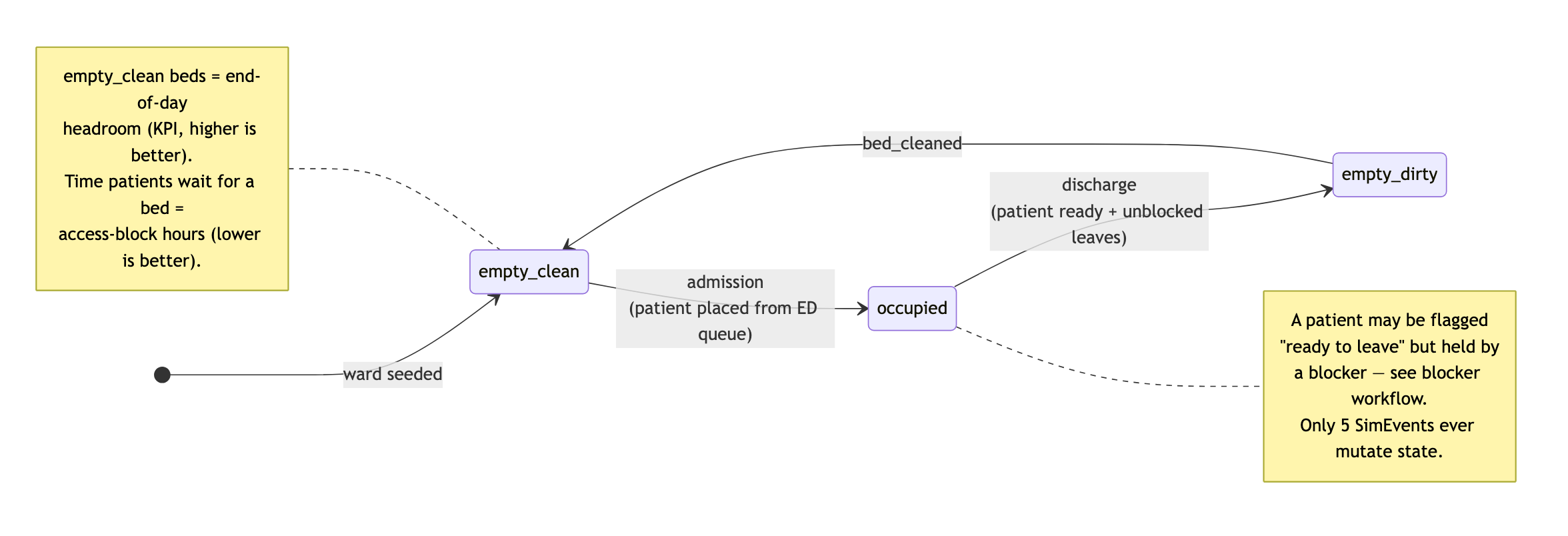
- Access-block hours: total time patients spend waiting for a bed. Lower is better.
- End-of-day headroom: clean, empty beds left at day's end. Higher is better.
The results, across a normal weekday and a flu surge:
| Day | Access-block hours (lower is better) | Beds free at end (higher is better) |
|---|---|---|
| Normal weekday | 14.5 → 9.0 (−38%) | 1 → 2 |
| Flu surge | 84.5 → 44.5 (−47%) | 1 → 2 |
The agent helps on both numbers, on both days. On the flu-surge day it clears about 40 bed-hours of waiting — roughly four patients spared a night stuck in the emergency department.
The stack
| Layer | Choice | Why |
|---|---|---|
| Agent runtime | OpenCode (opencode serve, headless) |
Built-in ReAct loop, helper agents, permission config, model-swap, and session audit. Everything an agent needs, off the shelf. |
| App + backend | Next.js (App Router) + the SDK | Drives one prompt per tick, and keeps the clock and the world mine. |
| Environment | In-process simulator | Typed events on a seedable clock. The only stateful, hospital-aware component. |
| Forecasts | Transparent heuristic behind a tool | You can always see why it predicted what it did, so the AI stays the star rather than a black-box forecaster. |
| Tools | TypeScript tool() + Zod |
Type-safe args, native to OpenCode's permission system. |
| Models | OpenCode Zen free tier by default, swappable to hosted Claude or local Ollama | Zero-key, zero-cost demo, with portability and no code change. |
| Auth | Better Auth + SQLite | Self-hosted accounts, server-side sessions, invite-gated sign-up, and viewer/coordinator/superadmin roles. |
| Tests | Vitest + Playwright | 250+ fast, deterministic tests. The safety and approval guarantees are tested, not assumed. |
It ships self-hosted: opencode serve plus the Next.js server, with the simulator in-process. Ingress is a Cloudflare Tunnel, so the app port is never published and the origin isn't directly routable. The default model is the OpenCode Zen free tier: no API key, no local server, no cost. Clone it and it runs.
What I learned
The hospital was never really the point. The shape is. An agent that watches a changing world, reasons over it with tools, proposes ranked actions, and stops for a human before anything irreversible is a pattern that travels well.
Swap the simulator for a warehouse and you have a stock-rebalancing assistant. Swap the discharge forecast for project deadlines and you have a planning co-pilot. Swap the approval card for a Slack message and you have a human-in-the-loop assistant for any job where an AI suggests and a person decides.
The four decisions above are the pattern, and they're coming with me to the next project: rent the harness, blindfold the model with tools, own the gate, seed the world.
Where it goes next
A few directions I'd take it further:
- Richer scenarios. More than a weekday and a flu surge (weekend staffing dips, mass-casualty spikes, seasonal patterns) to stress the agent against situations it hasn't seen.
- Smarter forecasting. The discharge and demand forecasts are deliberately simple, transparent heuristics. Swapping in a learned model (still behind the same tool boundary) would test how far the agent's reasoning holds when the inputs get noisier.
- Learning from approvals. Right now every tick starts fresh. Feeding back which suggestions coordinators accept or reject would let the ranking adapt to how a given ward actually works.
- A real integration boundary. The simulator speaks a small HTTP surface on purpose. Pointing the same tools at a sandboxed, fully synthetic copy of a real bed-management system (never live patient data) would test the design against messier inputs.
- Hospital-wide view. Two wards is enough to prove the loop; coordinating across an entire site, where freeing a bed in one place creates pressure in another, is the harder and more interesting version of the problem.
Diagrams
The four diagrams that map the system, collected in one place.
Component architecture
The tick cycle
How a blocked patient gets unstuck
The bed lifecycle
Source
Full source: github.com/devdaviddr/ai-patient-flow-orchestrator.